Screen and system audio, together
Record the display and everything you hear in one command, using native ScreenCaptureKit capture. Zero setup.
kilde records your screen together with the system audio that the screen recorder in QuickTime Player cannot capture — as a single-command CLI, and as a menu bar app. No virtual audio driver required.
macOS 14 or later · Apple silicon (arm64) · MIT licensed
# Check permissions and the environment first
$ kilde doctor

# Screen + system audio. Ctrl+C stops it and finalizes the file safely
$ kilde rec demo.mov

# A meeting: pick a window, mix the other participants and your mic
$ kilde rec --preset meeting meeting.mov

# Audio only, no extra driver needed
$ kilde rec --no-video memo.m4a
Record the call without bots — their voice (system audio) and yours (mic) in one file. Hit stop, and the transcript and summary finish on your Mac (transcription and summaries need macOS 26 or later).
kilde uses native ScreenCaptureKit, so the sound coming out of your Mac lands in the file alongside the picture — with no setup and no virtual audio device.
Record the display and everything you hear in one command, using native ScreenCaptureKit capture. Zero setup.
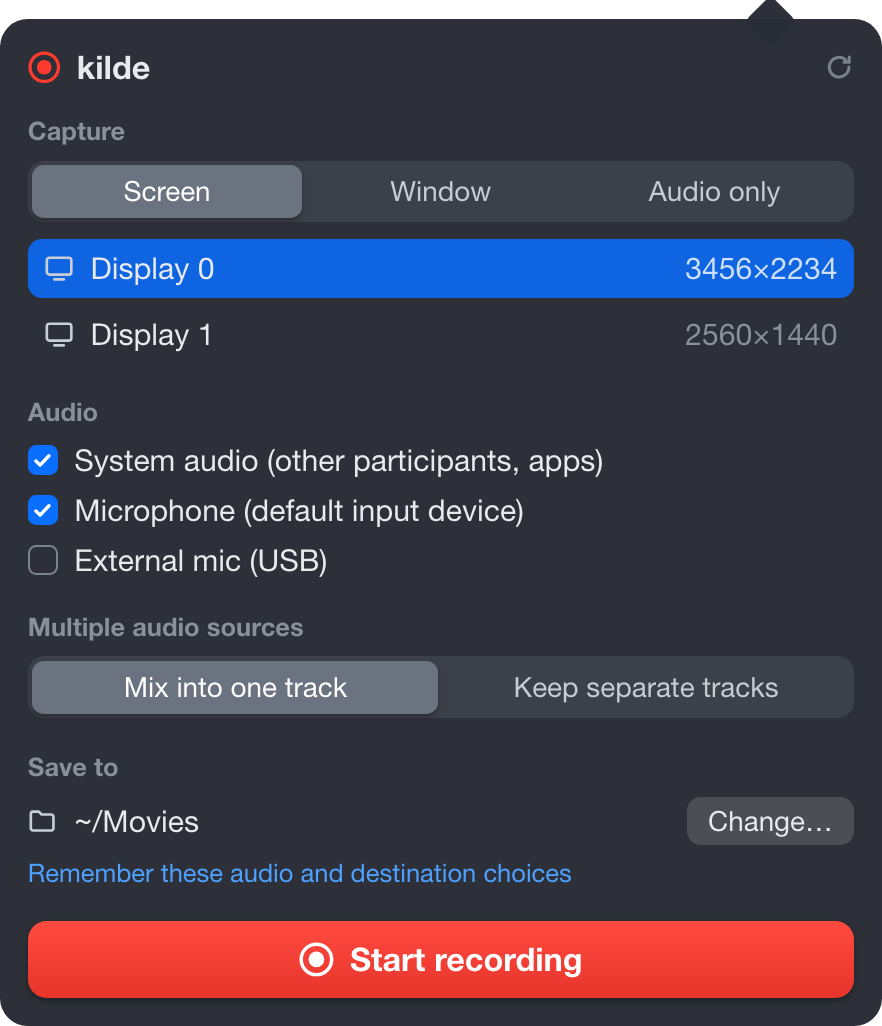
Capture a mic or a device such as BlackHole at the same time. Mixed into one track by default, or kept apart with --audio-tracks separate.
Capture a single window and scope system audio to its app — notification chimes and other apps stay out of the recording.
--no-video records sound alone, straight to M4A. No additional driver required.
Stopping a recording — with Ctrl+C, SIGTERM or SIGHUP — always finalizes the output file. A source you cannot open again is no source at all.
Start and stop from any app with a shortcut such as cmd+shift+r, set on the command line, in the config file, or in the menu bar app.
--preset meeting prompts for a Zoom, Google Meet or Teams window, then mixes the other participants' audio and your microphone into one track.
Record part of the screen with --region, choose H.264, HEVC or ProRes, set the frame rate, and capture HDR on macOS 15 or later.
The same engine behind a menu bar icon: elapsed time, per-source level meters, completion notifications, recent recordings, and launch at login.
The menu bar app comes from the Mac App Store. The CLI installs with Homebrew or a release binary. All builds are Apple silicon; Intel Macs are not supported at this time.
The menu bar app: record from the icon in your menu bar. Installs in one click, and the App Store keeps it up to date automatically.

Free · macOS 14 or later
$ brew tap kilde-team/kilde
# one-time, newer Homebrew only
$ brew trust --formula kilde-team/kilde/kilde
$ brew install kilde

# or, directly from the tap
$ brew install kilde-team/kilde/kilde
# Download kilde-<version>-macos.zip from Releases
$ unzip kilde-*-macos.zip
$ sudo cp release/kilde /usr/local/bin/

# Then check permissions
$ kilde doctor
kilde is built on macOS-native capture APIs, which sets a floor on what it can run on.
kilde doctor checks the environment and prompts for anything missing.kilde is the Danish and Norwegian word for source — literally a spring, where water rises from the ground, and by extension the source of a piece of information, as in a journalist's or a scholar's sources.
More and more knowledge is now created in online meetings and on screens. In an era when AI can transcribe, summarize and search recordings, those recordings — the video, the audio, the screen — are valuable sources of information in their own right, not byproducts to discard once the meeting is over.
kilde is named for the thing it exists to keep: the source. The same conviction is why kilde is built so that stopping a recording — even with Ctrl+C — always leaves a finalized, playable file.
A source you cannot open again is no source at all.
Step-by-step guides for the capture problems kilde was built to solve.
The sound your Mac plays — the other side of a call, a video, an app's music — with the screen, or as audio alone.
Both sides of the call in one file, recorded locally — no cloud recorder joining the meeting.
A transcript from your own recording, with no bot in the participant list.
Keep chimes and pings out of the take while still seeing the notifications themselves.
The meeting app's sound and nothing else — window capture on macOS 14+, app-specific audio on macOS 15+.